🔖 ফর্ম এবং ইনপুট (Forms & Inputs)
HTML-এ ইউজারের কাছ থেকে ডেটা নেওয়ার জন্য ফর্ম ব্যবহার করা হয়। একটি ফর্মে বিভিন্ন ধরনের ইনপুট ফিল্ড থাকতে পারে।
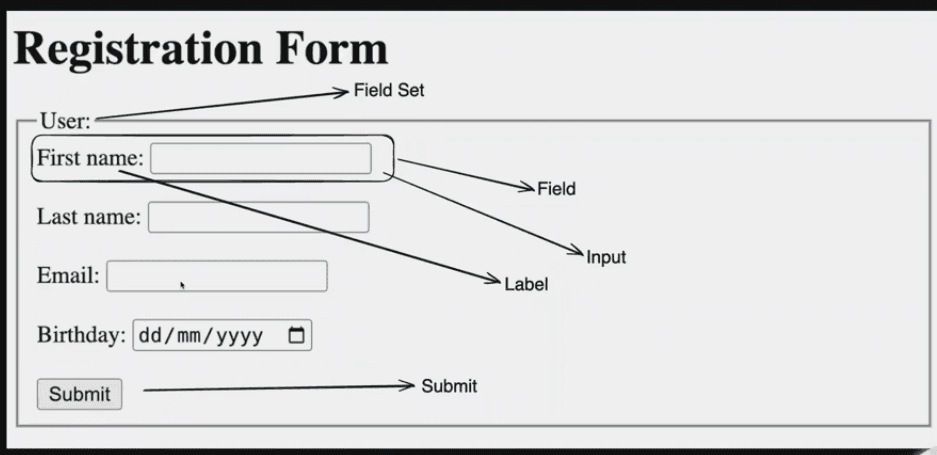
⚠️
গুরুত্বপূর্ণ টিপস: <label> এবং <input> ঠিকমতো সিঙ্ক (sync) বা কানেক্ট করার জন্য, label এর for বা (React-এ htmlFor) এর ভ্যালু এবং সংশ্লিষ্ট input এর id এর ভ্যালু সম্পূর্ণ এক (same) হতে হবে।
<!-- Example of Label and Input Sync -->
<form>
  <label for="username">First name:</label>
  <input type="text" id="username" name="username" placeholder="Enter first name" />
</form>
📌 HTML <form> Elements
The HTML <form> element can contain one or more of the following form elements:
<form>: ইউজারের ইনপুট নেওয়ার জন্য ফর্ম তৈরি করে।<input>: ইউজারকে ডেটা প্রবেশ করানোর জন্য ইনপুট নিয়ে কাজ করে।<label>: ইনপুট উপাদানগুলির জন্য একটি লেবেল তৈরি করে।<select>: ড্রপডাউন মেনু তৈরি করে।<textarea>: মাল্টি-লাইন টেক্সট লেখার সুযোগ দেয়।<button>: ক্লিক করা যাবে এমন একটি বাটন।<fieldset>: সম্পর্কিত ফর্ম উপাদানগুলোকে গ্রুপ করে থাকে (যেমন ছবিতে Field Set দেখা যাচ্ছে)।<legend>:<fieldset>এলিমেন্টের শিরোনাম নির্ধারণ করে (যেমন: User)।
📌 HTML Input Types
Here are the different input types you can use in HTML:
buttons.html
<!-- Button and Submit -->
<input type="button" value="Click Me">
<input type="submit" value="Submit Form">
<input type="reset" value="Reset Form">
texts.html
<!-- Text Inputs -->
<input type="text" placeholder="Enter Text">
<input type="password" placeholder="Enter Password">
<input type="email" placeholder="Enter Email">
<input type="search" placeholder="Search...">
<input type="url" placeholder="Enter URL">
<input type="tel" placeholder="Enter Phone">
selectors.html
<!-- Numbers, Range & Selectors -->
<input type="number" min="1" max="10">
<input type="range" min="0" max="100">
<input type="checkbox">
<input type="radio">
<input type="color">
<input type="file">
dates.html
<!-- Date & Time -->
<input type="date">
<input type="time">
<input type="datetime-local">
<input type="month">
<input type="week">
Last updated on